io.Connect Event Server
Extend Notifications. Control Logic. Coordinate at Scale.
Effective end-user notifications start long before anything appears on screen. Your infrastructure has to order, route, persist, store, and audit events — deciding which systems raise alerts, who receives them, and what happens when they are acted on or ignored. The io.Connect Event Server is the backend engine that turns raw events into coordinated, action-ready workflows, powered by real-time business logic, user groups, and AI systems.
Event Routing, Reimagined
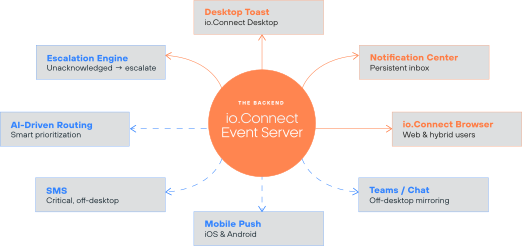
One backend engine, many destinations. The Notifications Center is one of several channels the Event Server powers, not the whole product.
Infrastructure First. UX Next.
A notification is only as good as the event behind it. Before a user can act, something has to decide that an event matters, who owns it, how long it lives, and what counts as resolved. When that logic is missing, users get noise; when it lives in each app, it gets duplicated and drifts.
The Event Server centralizes it. Engineering teams define which apps and systems send events, to whom, and when — with fully customizable lifecycle logic for ordering, routing, persistence, storage, and audit.
The io.Connect Notifications Center is the last mile. It is where end users see, sort, and act on what the server has already routed to them — in the desktop Notification Panel, as toasts, or in io.Connect Browser for web and hybrid users. The same events can also reach mobile push, SMS, and Teams for anyone off the desktop.
The Event Server
- Decides who is notified, when, and why
- Orders, persists, and stores events
- Routes to groups, escalates, assigns first-touch
- Records who saw and acted (audit)
- Publishes via REST API or Kafka
The Notifications Center
- Displays what the server sent
- Lets users sort, filter, and snooze
- Presents actions and buttons
- Reports the user’s action back
- Consumes via the io.Connect notifications API
Create Customized, Notification-Driven Workflows
Your engineering teams already build the workflows your users rely on. The Event Server lets them define which apps and systems raise events, who receives them, and what happens next – with lifecycle logic that runs on the server, not in the UI.
Use cases
- Notification groups — route one event to multiple users who share visibility and responsibility
- First-touch routing — notify many, assign the task to the first user who responds
- Four-eyes approval — require two users to review or act before an event is resolved
- Action-based workflows — trigger predefined or dynamic actions when a user interacts with a notification
- Escalation — unacknowledged events escalate automatically on rules you define
- AI-triggered events — AI systems generate or respond to events just like a human user
Built for the Engineers Behind the UI
- Publish events — via REST API or Kafka
- Configure persistence — on a time basis or within and across user sessions
- Configure retry and expiration parameters
- Pre-define or dynamically assign action handlers — to notifications
- Route — to user groups, escalation chains, and first-touch assignment
- Support — OpenID Connect and custom authentication
- Deploy — behind the firewall, on-prem or in cloud environments
Build a Better Notification System Today
Delivered with Professional Services
The Event Server is not a plug-and-play product. It is a backend capability tailored to your specific workflows, user groups, and enterprise environment — which is why implementation is delivered in partnership with interop.io Professional Services. Our team works with yours to design, deploy, and optimize your event infrastructure, so every notification behaves exactly as your business requires.
